
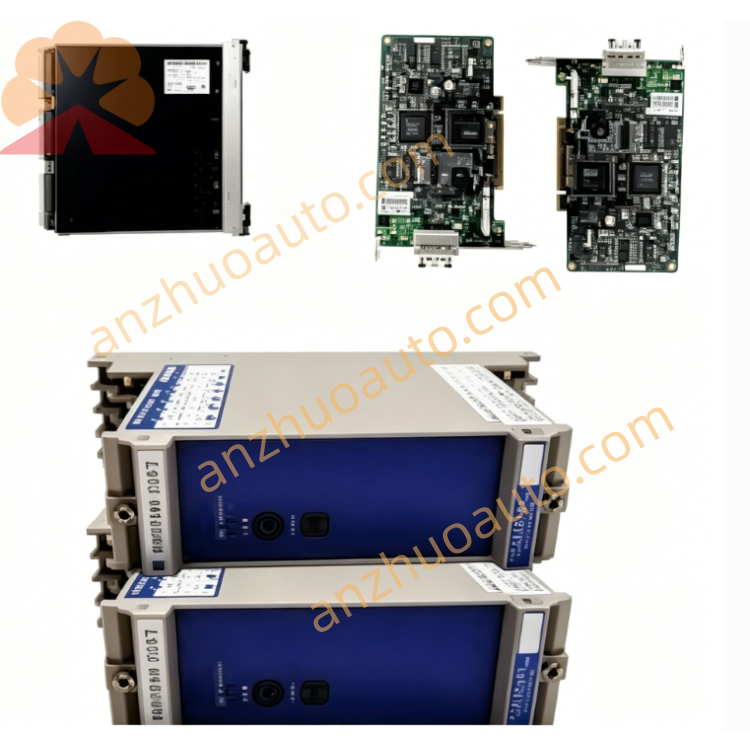
GE IS215WETAH1BB WETA Topbox B Ethernet I/O Communication Module for Mark VI & Mark VIe Turbine Control System
June 11, 2026

GE IS215WETAH1BB WETA Topbox B Ethernet I/O Communication Module for Mark VI & Mark VIe Turbine Control System

IS215WETAH1BB is an original GE WETA series Topbox B industrial Ethernet I/O module, exclusively designed for Speedtronic Mark VI and Mark VIe gas, steam and wind turbine distributed control systems, manufactured in the United States. As a field signal acquisition and communication conversion unit, it connects the main UCVD controller rack with wind turbine top cabinet and on-site auxiliary equipment, responsible for collecting mass digital switching signals and transmitting real-time control commands via backplane bus and independent industrial Ethernet channel. It integrates built-in signal isolation, EMI filtering and hardware self-test circuits, with multi-group LED diagnostic indicators on the front panel for real-time running status monitoring. Supporting hot-swap replacement without full system power cut, the module adopts full conformal coated PCB and reinforced anti-vibration structure. It reliably works at -30℃ ~ +65℃ with 10%–95% non-condensing humidity, and meets Class I Division 2 hazardous area certification. Widely applied in wind farms, thermal power plants, oil & gas compressor stations and heavy industrial turbine automation projects with high anti-interference and communication stability requirements.

Description

1. Product Overview

IS215WETAH1BB is the Topbox B variant of GE WETA Ethernet I/O module, matching the Topbox A module to form a complete on-site signal acquisition system for wind turbine top cabinets. Its core function includes conditioning, filtering and uploading field digital input signals to the rack’s UCVD main control board through the Mark VIe high-speed backplane bus, and distributing control output signals issued by the main controller to on-site actuators via terminal wiring. The independent front Ethernet RJ45 port provides convenient local debugging, parameter configuration and auxiliary data uploading, which effectively reduces long-distance signal wiring between the control room and wind tower. The hot-swap design greatly shortens maintenance downtime; conformal coating protects internal circuits from moisture, dust and corrosive gas in harsh industrial environments, while anti-vibration PCB layout adapts to long-term vibration of wind turbine equipment. It can coordinate with PMVP and PMVD series I/O termination modules to build a complete redundant turbine control signal architecture.

2. Core Technical Specifications

  1. Communication Interfaces

  • Mark VIe high-speed backplane internal bus for data interaction with rack main controller

  • Front industrial Ethernet RJ45 port for on-site debugging and auxiliary monitoring

  • Multi-channel spring terminal blocks for field digital input and output wiring

  1. Signal Processing Performance

  • Reinforced electrical isolation for all signal channels

  • Multi-stage digital filtering to suppress strong electromagnetic interference

  • Real-time hardware self-diagnosis for channel open circuit, short circuit and communication failure

  • Hot-swap maintenance support without shutting down the whole control system

  1. Electrical Parameters

  • Operating Power: 18–36 VDC wide-range DC input

  • Integrated overvoltage, overcurrent and reverse polarity protection circuit

  1. Environmental & Safety Standards

  • Operating Temperature: -30℃ ~ +65℃

  • Storage Temperature: -40℃ ~ +70℃

  • Relative Humidity: 10%–95% RH, non-condensing

  • Hazardous Certification: Class I Division 2

  • PCB Protection: Full-board anti-moisture, anti-corrosion conformal coating

  • Protection Grade: IP20, for internal cabinet installation only

  1. Mechanical Specifications

  • Mounting Method: Standard 35mm DIN rail installation

  • Anti-vibration industrial PCB layout

  • Origin: Salem, Virginia, USA

  1. Warranty: 12-month factory original warranty for brand-new modules

3. Front Panel & Terminal Layout Description

  1. LED Diagnostic Indicator Area

  • Power LED: Solid green = normal power supply; Off = power loss or reversed wiring polarity

  • Run LED: Slow green flicker = normal data transmission; Fast flicker = firmware upgrade in progress

  • Fault LED: Solid red = severe hardware or channel fault; Amber flash = minor signal abnormal warning

  • Ethernet Link LED: Green flicker = normal Ethernet communication; Off = Ethernet connection disconnected

  1. Ethernet RJ45 Port

    Connect portable debugging equipment, local touch screen or auxiliary monitoring host to export fault logs and modify module operating parameters offline

  2. Multi-Position Spring Terminal Blocks

    Two groups of numbered wiring terminals for field digital input and output signal cables, spring locking design to prevent loose contact caused by vibration

  3. DIN Rail Locking Buckle

    Elastic buckle at the bottom of the module, used to fix the module firmly on the DIN rail and avoid sliding during mechanical vibration

4. Standard Installation Steps

Step 1 Cabinet Preparation
Install standard 35mm DIN rail inside a sealed control cabinet, reserve at least 4cm ventilation space around the module to prevent heat accumulation under full load. Ensure the cabinet cooling and dehumidification equipment operates normally.
Step 2 DIN Rail Fixation
Align the bottom buckle of IS215WETAH1BB with the DIN rail, press down and lock the buckle tightly. Multiple modules can be installed side by side without signal crosstalk.
Step 3 Wiring Sequence
  1. Connect 24VDC control power cable to the power terminal, strictly distinguish positive and negative poles to avoid reverse connection damage;

  2. Route field digital input and output signal cables to corresponding numbered channel terminals and fasten spring screws;

  3. Insert shielded Ethernet cable into the front RJ45 port if local debugging or auxiliary monitoring is required;

  4. Insert the module into the Mark VIe rack backplane slot to complete internal communication connection with the main controller.

    Step 4 Pre-Power-On Inspection

    Check all terminals for tight wiring, confirm no over-exposed wire cores, short circuits or extruded damaged cables. Only GE certified shielded signal cables can be used for field wiring to reduce electromagnetic interference.

    Step 5 Power-On Commissioning

    Supply rated DC power to the module and the entire Mark VI/VIe control system. Confirm Power LED stays solid green, Run LED flickers slowly and Ethernet Link LED flashes periodically. Use debugging equipment via Ethernet to verify signal collection and control output response; installation acceptance is completed when all technical indicators meet standards.

5. Daily Operation & Maintenance Rules

  1. Normal Operation Standard

    All front panel LEDs maintain normal operating states without persistent red fault alarms; the upper monitoring HMI of turbines or wind farms displays no signal loss, channel short/open circuit or communication disconnection alarms.

  2. Regular Inspection Checklist

  • Shift Inspection: Record LED indicator status and abnormal alarm information in the operation log;

  • Monthly Maintenance: Blow dust on ventilation gaps and terminal blocks with dry compressed air blower;

  • Quarterly Inspection: Retighten all power and signal wiring terminals, check cable aging and terminal oxidation.

  1. Environmental Maintenance

    Keep the control cabinet fully sealed and run the dehumidifier continuously to maintain low internal humidity; isolate corrosive gas, conductive dust and water vapor from the module installation area.

6. Common Fault Diagnosis & Troubleshooting

Fault 1: Power LED always off
Possible Causes: DC power supply interruption, reversed power terminal polarity, burnout of internal power circuit
Solutions: Measure cabinet 24VDC output voltage; rewire power terminals with correct positive and negative polarity; replace the module if internal power hardware is permanently damaged.
Fault 2: Red Fault LED keeps solid on
Possible Causes: Short circuit of field signal channel, backplane bus communication failure, corrupted firmware program
Solutions: Disconnect field wiring one by one to locate the short-circuit channel; reinsert the backplane connector; reflash official matched firmware through the Ethernet port.
Fault 3: Ethernet Link LED is always off
Possible Causes: Loose or damaged Ethernet cable, dust-covered RJ45 port contacts, failure of Ethernet communication chip
Solutions: Reconnect or replace original GE shielded Ethernet cable; wipe port contacts with clean soft cloth; replace the module if the Ethernet interface hardware fails.
Fault 4: Run LED flashes rapidly with disordered signal data
Possible Causes: Interrupted firmware upgrade, cabinet internal temperature continuously exceeding 65℃
Solutions: Complete the full firmware upgrade without power interruption; turn on cabinet cooling equipment to reduce ambient temperature.
Fault 5: Partial signal channels have no response
Possible Causes: Loose wiring of corresponding terminal blocks, failure of on-site sensors/actuators, damage of internal channel processing circuit
Solutions: Retighten terminal screws of faulty channels; test field equipment on site; replace the module if internal signal circuit is broken.

7. Mandatory Safety Precautions

  1. Cut off the module DC power supply before wiring, disassembly and maintenance. Although the module supports hot-swap, power-off operation is recommended for long-term maintenance to prevent signal surges from impacting the main controller.

  2. Only original GE matched shielded signal cables and Ethernet cables are allowed for wiring; uncertified third-party cables will cause severe communication interference and void the factory warranty.

  3. Immediately stop field signal collection and start cabinet cooling equipment when the operating ambient temperature exceeds 65℃; long-term over-temperature will cause irreversible damage to internal signal isolation circuits.

  4. Unauthorized disassembly of the module housing and internal circuit components is prohibited; hardware damage caused by private disassembly is not covered by the warranty.

  5. Use anti-static and shockproof packaging for transportation and storage; avoid heavy collision, extrusion and static discharge to protect internal precision signal processing chips.

  6. This module participates in wind turbine and turbine safety control loops. All replacement, firmware debugging and fault maintenance work must be operated by certified GE industrial control technicians.

8. Long-Term Storage Requirements

Store IS215WETAH1BB in a dry and ventilated warehouse, storage temperature range -40℃ ~ +70℃, relative humidity controlled below 80%. Keep away from chemical corrosives, heavy stacking pressure and mechanical impact. Modules stored for more than 6 months must complete full communication, digital input/output and Ethernet function tests before cabinet installation.

Reliability Information Statement

Confirmed Information: IS215WETAH1BB is GE Mark VI/VIe WETA Topbox B Ethernet I/O module, DIN rail mounting, hot-swap support, front LED diagnostic array and Ethernet debugging port, 18–36VDC wide voltage power supply, -30~+65℃ operating temperature, Class I Division 2 certification, full conformal coated PCB, original made in USA, 12-month standard factory warranty.
Information to Be Further Verified: Exact number of digital input/output channels, maximum load current per channel, complete official fault code table, detailed step-by-step Ethernet firmware upgrade operation guide.


Get a Quote