
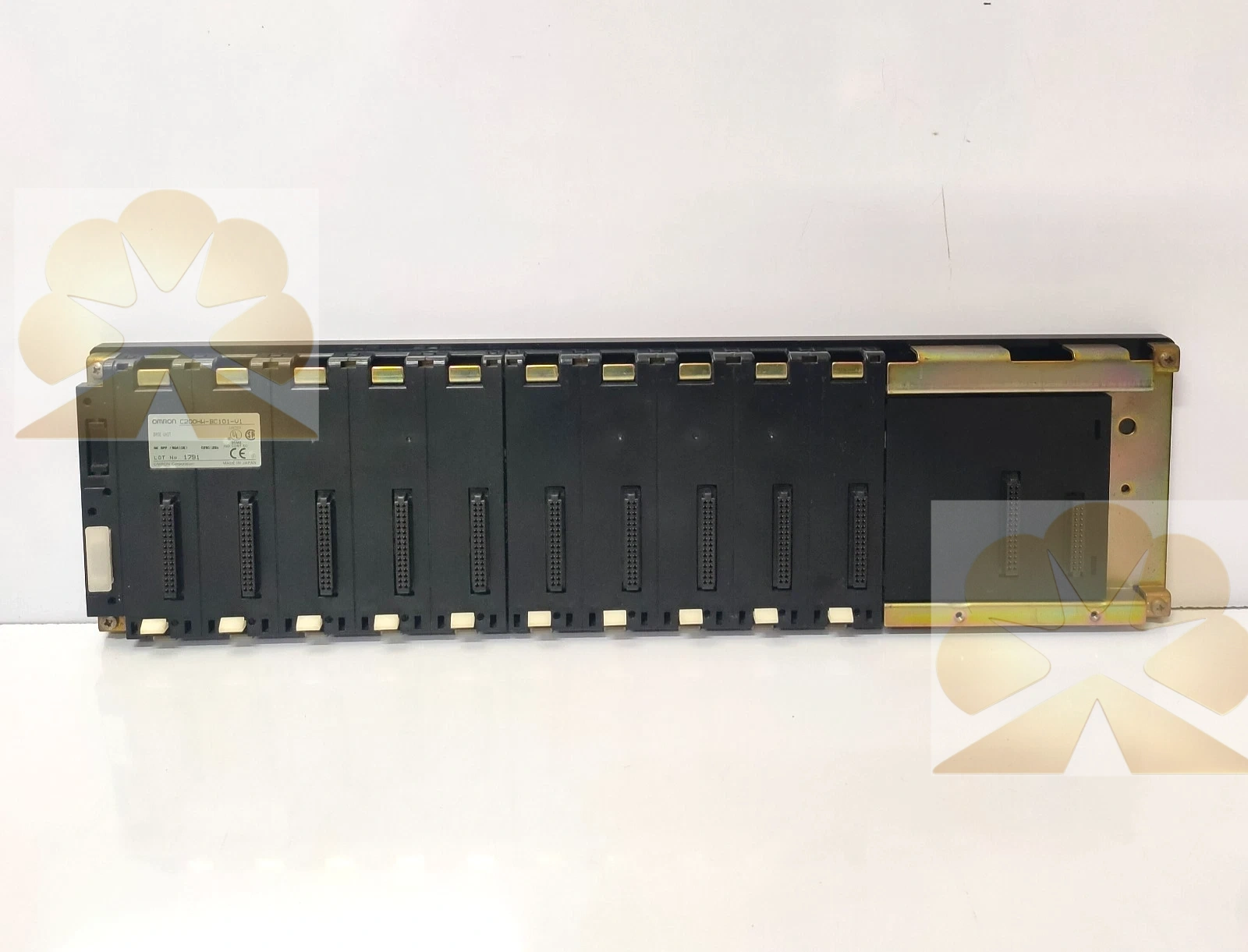
Description
OMRON C200HW-BC101-V1: C200Hα CPU Rack Backplane Product Description
Brand and Product Identification
The OMRON C200HW-BC101-V1 is a CPU backplane, also called a CPU I/O backplane or rack base, for the Omron SYSMAC C200HX, C200HG and C200HE programmable controller series. The model C200HW-BC101-V1 identifies a 10-slot CPU rack backplane. It forms the base of the CPU Rack, together with the CPU Unit, Power Supply Unit and mounted I/O or special I/O Units. The BC101-V1 is the CPU Rack version, while the related BI101-V1 is an expansion or extended backplane for additional I/O racks.
Product Function and System Role
The C200HW-BC101-V1 backplane provides the mechanical mounting positions and internal bus connections for the Omron C200Hα CPU rack. I/O Units, high-density I/O Units and special I/O Units plug into the backplane slots, and the backplane backplane bus carries power, address and data signals between the CPU Unit, power supply and mounted modules. The CPU Rack is the main rack containing the CPU Unit; additional expansion I/O racks can be connected to the CPU Rack for the SYSMAC C200HX, C200HG and C200HE systems.
Slot Configuration
The C200HW-BC101-V1 provides 10 I/O slots. Other CPU backplane models in the same family include the C200HW-BC031 with 3 slots, C200HW-BC051 with 5 slots and C200HW-BC081-V1 with 8 slots. The BC101-V1 10-slot version is used when the CPU rack requires the largest number of local I/O or special module slots within the C200Hα rack lineup. Mounted units can include discrete input and output modules, analog modules, high-speed counter, positioning, communication, Ethernet, PC card or other special I/O units compatible with the C200HX, C200HG or C200HE CPU.
Mechanical Dimensions
The C200HW-BC101-V1 backplane dimensions are 491 mm in length A and 505 mm in width W according to the C200Hα brochure. The related C200HW-BC081-V1 8-slot backplane measures 421 mm by 435 mm, showing how backplane length and width increase with slot count. The backplane mounts in a control panel or rack enclosure, with CPU Unit, Power Supply Unit and I/O Units seated on the base connectors. Exact mounting clearances and panel cutout dimensions should be checked against the Omron C200Hα installation manual and backplane drawing.
System Architecture
The C200Hα system is built around a CPU Rack containing the CPU Unit, Power Supply Unit and backplane. The CPU Unit for the C200HX, C200HG and C200HE series handles program execution, I/O processing, communication and special function control. Two or three expansion I/O racks can be connected to the CPU Rack to extend local I/O capacity. Expansion racks use their own extended backplane, such as the C200HW-BI101-V1, and are linked to the CPU Rack through an I/O connecting cable. Special communication or networking units can be mounted in the CPU or expansion rack according to the system configuration.
Compatible Controller and Modules
The C200HW-BC101-V1 is designed for SYSMAC C200HX, C200HG and C200HE programmable controllers. It accepts C200Hα I/O Units, high-density I/O Units and special I/O Units compatible with the CPU Rack. Examples of supported system units include digital and analog I/O modules, high-density I/O modules, positioning or high-speed counter modules, Ethernet cards, PC card units and communication or networking modules. The module combination, I/O address assignment and rack capacity must match the CPU model, program requirements and Omron system limits.
Installation and Wiring Notes
Installation should follow the Omron C200HX, C200HG and C200HE system manual and backplane installation instructions. Mount the backplane in the control panel, seat the Power Supply Unit and CPU Unit, then plug the I/O and special modules into the assigned slots. Remove system power before installing or removing units, and observe ESD precautions. Verify module orientation, slot assignment, connector seating and rack cable connections before applying power. Field wiring is connected to the mounted I/O units rather than directly to the backplane itself.
Commissioning and Maintenance Notes
After mounting the rack, confirm that the CPU recognizes the installed I/O and special modules, that I/O addresses match the PLC program, and that rack expansion or communication cables are correctly connected. During maintenance, inspect backplane connectors, module seating, power supply wiring and rack cable connections for looseness or corrosion. If a module fails to communicate, check its slot position, connector contact, module type, CPU configuration and expansion rack connection. Replacement backplanes must match the C200HW-BC101-V1 CPU Rack model rather than the expansion BI101-V1 version.
Advantages and Selection Notes
The C200HW-BC101-V1 offers 10 slots for local C200Hα CPU rack expansion, compatibility with C200HX, C200HG and C200HE controllers, and a standard Omron rack base for I/O and special module mounting. The C200Hα series is an older Omron PLC platform, and related product status should be verified with current Omron or distributor information. When selecting a replacement backplane, distinguish CPU Rack BC models from expansion Rack BI models, confirm slot count, controller compatibility and module list. The C200HW-BC101-V1 is a PLC rack backplane, not a CPU, power supply, I/O module, field sensor or communication network; its role is to mount and interconnect the CPU rack units on the internal PLC bus.
Get a Quote