
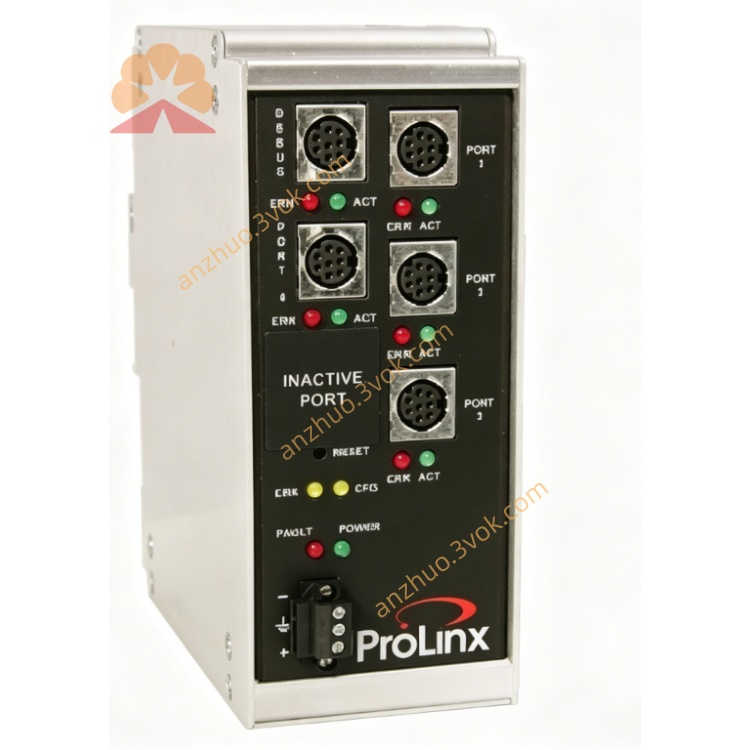
5201‑MNET‑101S Modbus‑TCP to IEC‑60870‑5‑101 Slave Gateway
Description
1. Product Overview
Part Number: 5201-MNET-101S
Manufacturer: ProSoft Technology
Product Type: Industrial DIN rail protocol gateway
Function: Converts Modbus TCP/IP (Ethernet) to IEC 60870-5-101 (serial, slave). Enables modern Modbus TCP systems to communicate with legacy 101-based SCADA/RTU devices widely used in power & utility.
2. Main Features
Modbus TCP/IP: Client/server, up to 20 simultaneous connections.
IEC 60870-5-101: Slave only, FT1.2 frame format, balanced/unbalanced modes.
Serial Port: RS-232/422/485 selectable; baud rate 300–19200 bps.
Data Mapping: Flexible Modbus register ↔ 101 point mapping (binary, analog, counters).
Event Handling: Supports 101 spontaneous events, time-tagging, and interrogation.
Diagnostics: Built-in web server & PCB (ProSoft Configuration Builder) support.
Industrial Hardened: Isolation, EMC protection, wide temperature range.
Configuration: Easy setup via software; online monitoring & fault logging.
3. Technical Specifications
3.1 Power
Rated: 24 VDC
Range: 18–32 VDC
Max power: ≤12 W
3.2 Ethernet (Modbus TCP/IP)
Speed: 10/100 Mbps auto-sense
Connector: RJ45
Functions: Read/write coils, registers; exception handling
3.3 Serial (IEC 60870-5-101 Slave)
Physical: RS-232/422/485 (terminal block)
Baud rate: 300/600/1200/2400/4800/9600/19200 bps
Data format: 8N1 fixed
Protocol: IEC 60870-5-101, FT1.2, station address 0–254
Supported ASDU: Single-point, double-point, analog, counter, etc.
3.4 Environmental
Operating temp: -20°C to +60°C
Storage temp: -40°C to +85°C
Humidity: 5–95% non-condensing
Vibration: IEC 60068-2-6 compliant
3.5 Mechanical
Mounting: 35 mm DIN rail
Dimensions: ~137 × 51 × 112 mm
Protection: IP30
Approvals: CE, UL
4. LED Indicators
PWR: On = power OK
RUN: Blinking = operating normally
ENET: Blinking = Modbus TCP activity
COM: Blinking = 101 serial traffic
ERR: On = fault (config, comm, or mapping error)
5. Installation & Wiring
Mount on DIN rail in cabinet.
Connect 24 VDC (observe polarity).
Connect Ethernet to Modbus TCP network (PLC/SCADA).
Wire serial port to 101 master (RTU/MTU):
RS-485: Data+, Data-, GND
RS-232: TX, RX, GND
Set serial mode (232/422/485) via DIP switches or software.
Configure via PCB: IP, 101 slave address, baud rate, data map.
Download config and power-cycle.
6. Communication & Data Mapping
Modbus → 101: Write coils/registers → 101 single/double points, analog values.
101 → Modbus: 101 events/measurements → Modbus discrete inputs, input registers.
Interrogation: Supports general/group interrogation from 101 master.
Time Sync: Optional time-tagging via Modbus or 101 time messages.
7. Typical Applications
Power Utilities: Connect Modbus TCP PLCs to legacy 101 RTUs in substations.
Water/Wastewater: Integrate 101-based SCADA with modern Modbus TCP systems.
Oil & Gas: Migrate old 101 sites to Modbus TCP without replacing RTUs.
Industrial Modernization: Bridge new Ethernet controls to existing serial 101 devices.
8. Safety & Best Practices
Wiring: Use shielded cable for serial; separate power/data wires.
Grounding: Earth gateway and cable shields at one point.
Termination: Enable 120 Ω termination at ends of RS-485 bus.
Configuration: Restrict Modbus access; validate mapping ranges.
Maintenance: Keep firmware updated; monitor LED status and logs.
Get a Quote