
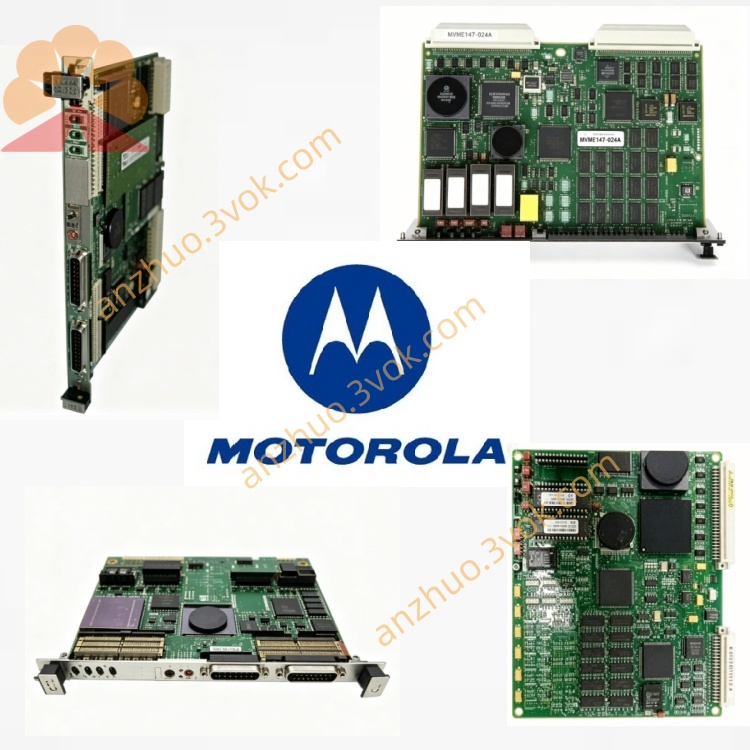
MVME2434-134 VME64 Single Board Computer MPC750 PowerPC SBC with MVME7134 I/O Transition Board
Description
I. Product Overview
MVME2434-134 is a 6U VME high-performance rugged single-board computer (SBC) in the MVME2400 series, focusing on military, aviation, radar, rail transportation, and industrial control. It is a 6U full-size, dual-gigabit, large memory, wide temperature range (-40°C to +85°C), IEEE 1101.10 ruggedized, and highly resistant to vibration/high reliability scenarios.
1.1 Core Configuration (‑134 Type)
CPU: PowerPC 750 (G3), 400 MHz
Cache: 32KB I + 32KB D L1; 1MB L2
Memory: 128MB ECC SDRAM (built-in)
Flash: 16MB NOR (system firmware) + optional NAND
Network ports: 2×10/100/1000Mbps Gigabit Ethernet
Expansion: 2×PMC (32/64bit), 1×Mini-PCI
Temperature: -40℃ ~ +85℃ (operating)
Hardening: IEEE 1101.10, triple coating, shock resistance, military screening
Size: 6U VME single slot (233.4 × 160mm)
1.2 Application scenarios
Military / Aviation: Radar, flight control, mission computers
Industrial control: PLC, DCS, high-speed data acquisition
Rail transportation: Vehicle control, communication gateway
Embedded real-time systems: VxWorks, Linux, QNX
II. Panel and Interface Definitions (Front Panel)
2.1 Front Panel Layout (From Left to Right)
P1/P2 VME Bus Interface (Back Panel)
LED Indicators (4)
PWR (Green): Normal Power Supply
RUN (Green): System Running / Heartbeat
ERR (Red): Fault / Alarm
ACT (Yellow): I/O / Network Activity
Ethernet Ports (2×RJ45)
ETH0: Gigabit (Primary)
ETH1: Gigabit (Backup)
Serial Ports (2×DB9)
CONS: RS-232 Debug Port (115200, 8N1)
COM1: RS-232/422/485 (Optional)
USB 2.0 (1×Type A)
Reset Button (RESET): Hard Reset
PMC Expansion Slot Covers (2×)
2.2 Back Panel Interfaces (P1/P2)
P1: VME64 Bus (A16/A24/A32, D8/D16/D32, DMA, BLT)
P2: VME64 Expansion + Power + Backup I/O
III. Installation and Mechanics
3.1 Environmental Requirements
Operating Temperature: -40°C ~ +85°C
Storage Temperature: -55°C ~ +95°C
Humidity: 5%–95% No Condensation
Vibration: 5g (5–2000Hz), Complies with IEEE 1101.10
3.2 Installation Steps
Power Off: Complete Power Off of VME Cabinet
Anti-static: Wear Anti-static Bracelet and Ground
Align Slots: Align the Board Cards to the 6U VME Slot and Push In Steadily
Fix: Tighten the Up and Down Fixing Screws (Torque 1.2–1.5N·m)
Connect Cables: RJ45, DB9, USB, etc.
Power On: Power On the Cabinet First, Then Start the System
3.3 Cooling
No Fan Design, Natural Convection Cooling
When Environmental Temperature > +70°C, It is Recommended to Use Forced Air Cooling for the Cabinet
IV. Power On and Initial Configuration
4.1 Power On Sequence
Cabinet Power → PWR Green Light Stays On
Firmware Startup → RUN Green Light Flashes (1Hz)
System Loading → RUN Green Light Stays On
Faults → ERR Red Light Stays On / Flashes
4.2 Serial Console (Default Parameters)
Port: CONS (DB9)
Baud Rate: 115200 bps
Data Bits: 8, Stop Bits: 1, Parity: None (8N1)
Connection: DB9 → PC Serial Port / USB-TTL
4.3 Firmware (U-Boot/Factory BIOS)
Press Space to Enter Firmware Menu
Firmware Version: MVME2434-134-V2.4.0 (2025)
Configurable Items:
Network IP (ETH0 Default: 192.168.1.100)
Boot Sequence: Flash → Network → USB
Memory / Cache Parameters
VME Bus Address Mapping
V. Operating System Installation and Use
5.1 Supported OS
VxWorks 5.5/6.x (Officially Recommended)
PowerPC Linux (2.6/3.x) QNX 6.x
LynxOS
5.2 VxWorks Quick Boot
Set the IP address of ETH0 in the firmware, enable TFTP
Load the VxWorks image from TFTP
Or directly boot from the on-board NOR Flash
Login: target, Password: (empty)
5.3 Network Configuration (Linux Example) bash
Operation
ifconfig eth0 192.168.1.100 netmask 255.255.255.0
ifconfig eth1 192.168.1.101 netmask 255.255.255.0
Six. Hardware Maintenance and Calibration
6.1 Regular Maintenance (every 6 months)
Dust removal: Brush + compressed air (≤ 0.5 MPa)
Check screws: Fixed screws, PMC panel
Interface check: RJ45, DB9, VME gold fingers (no oxidation / deformation)
Firmware upgrade: Latest firmware from the official website (V2.4.0+)
6.2 Battery Replacement (NVRAM/RTC)
Battery model: CR2032 (3V)
Life: 5 years
Replacement: Power off → Remove old battery → Place new battery with positive pole upward → Power on and calibrate
Seven. Fault Troubleshooting (Common Problems)
7.1 No response upon power-on (PWR does not light up)
Check +5V power supply of the chassis (current ≥ 5A)
Check fuse of the board (F1)
Reinsert and reposition the board, clean VME gold fingers
7.2 RUN does not light up / ERR red light
RUN does not light up: Firmware damage → Reburn Flash
ERR constantly on: Memory failure → Replace SDRAM
ERR flashing: VME bus conflict → Check address mapping
7.3 No network connection
Check Ethernet 0/1 network cables / switch
Firmware / system IP address conflict
Network port damage → Enable backup network port
7.4 No output from serial port
Baud rate / parameters error (must be 115200 8N1)
Serial port cable reversed (TX ↔ RX)
Console disabled → Firmware restore default
Get a Quote