
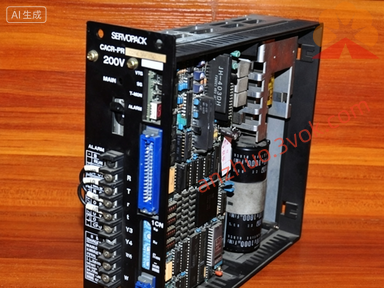
CACR-SR15SB1BF-Y160
1. Product Introduction
CACR-SR15SB1BF-Y160 is a 1.5kW AC servo drive belonging toof the Yaskawa VS-800 series, featuring factory-customized parameters and I/O logic (markidentified by the -Y160 suffix). It is designed with high dynamic response capability and superior energy efficiency, making it suitable for industrial automation equipment, machine tools, and other scenarios that requireing precise control. This servo drive boastoffers stable performance, simple operation, and strong durability, adopting high-quality components and an optimized heat dissipation design to support continuous operation, which can significantly improve equipment efficiency and product quality in practical applications. Its rated output power is 1.5kW, with a 3-phase AC 200~230V, 50/60Hz input voltage, 11.4A (RMS) rated output current, and 54A peak output current (300% overload, maximum 3 seconds). It supports position pulse and analog speed control modes, matchesis compatible with an incremental encoder (2500p/rev, 5V), has an IP20 protection grade, and is suitable for operating environments with 0~55°C (no condensation). The -Y160 suffix indicates it idenotes a factory-specialized customized version, with fixed I/O logic, gain parameters, and motion sequences for specific equipment, which cannot be replaced by —standard models or other customized versions cannot replace it.
Description
1. Product Introduction
CACR-SR15SB1BF-Y160 is a 1.5kW AC servo drive belonging toof the Yaskawa VS-800 series, featuring factory-customized parameters and I/O logic (markidentified by the -Y160 suffix). It is designed with high dynamic response capability and superior energy efficiency, making it suitable for industrial automation equipment, machine tools, and other scenarios that requireing precise control. This servo drive boastoffers stable performance, simple operation, and strong durability, adopting high-quality components and an optimized heat dissipation design to support continuous operation, which can significantly improve equipment efficiency and product quality in practical applications. Its rated output power is 1.5kW, with a 3-phase AC 200~230V, 50/60Hz input voltage, 11.4A (RMS) rated output current, and 54A peak output current (300% overload, maximum 3 seconds). It supports position pulse and analog speed control modes, matchesis compatible with an incremental encoder (2500p/rev, 5V), has an IP20 protection grade, and is suitable for operating environments with 0~55°C (no condensation). The -Y160 suffix indicates it idenotes a factory-specialized customized version, with fixed I/O logic, gain parameters, and motion sequences for specific equipment, which cannot be replaced by —standard models or other customized versions cannot replace it.
2. Installation & Wiring
2.1 Installation
Install the servo drive vertically in a control cabinet, leaving no less than 50mm clearance on all sides to ensure effective heat dissipation. The installation environment should be clean and dry, free from dust, oil fumes, corrosive gases, and excessive vibration to ensure stable operation of the equipment.
2.2 Simplified Wiring
When wiring, fFollow the correct sequence when wiring: first, connect the motor U/V/W and encoder cable to the CN2 interface, ensuring correct wiring to avoid signal loss or equipment damage; then, connect control signals (such as pulse and direction) to the CN1 interface, which adoptuses -Y160 customized I/O logic (do not use standard I/O wiring diagrams); finally, connect the 3-phase power supply to the R/S/T terminals and reliably ground the drive, ensuring the ground resistance is not more than 10Ω. It should be nNoted that power cables with a cross-sectional area of no less than 2.5mm² should be used for the main circuit, and shielded twisted-pair cables should be used for signal cables to reduce electromagnetic interference. Before formal operation, it is recommended to check the wiring point by point and conduct debugging step -by -step debugging accordance withing to the debugging outline to ensure thecorrect wiring is correct and theand normal system operates normallyion.
3. Basic Operation
3.1 Panel Button Functions
The core buttons on the panel of CACR-SR15SB1BF-Y160 panel include MODE, SET, ↑/↓, and RUN/STOP. The MODE button is used to switches between monitoring mode and fault modes; the SET button is used to confirms operations and enteraccesses related settings; the ↑/↓ buttons are used to adjust parameter values or switch monitoring items; the RUN/STOP button is used to starts or stops local jog operation. Most alarm and error problemissues can be initially resolved by resetting parameters, resetting the drive, or re-powering it, but complex faults are not suitable for on-site arbitrary handlingshould not be handled arbitrarily on-site and should be referred to professional technical support.
3.2 Common Operations
For local jog operation,: press the MODE button to select "JOG" mode, press SET to confirm, then use the ↑/↓ buttons to control the motor to jog forward or backward, and press STOP to end the jog operation. For monitoring,: press the MODE button to switch and check real-time data such as motor speed, output current, and fault codes. For parameter operation,: press the MODE button, enter the default password 0000, and press SET to enteraccess the parameter interface; n. Note that all parameters of the -Y160 customized version are factory-locked, which—they can only be viewed and cannot be modified, not arbitrarily modified, to avoid equipment failure. After completing basic debugging, you can gradually carry ouonduct semi-automatic and automatic operation tests, observe multiple working cycles, and ensure the system can workoperates continuously and correctly.
4. Common Faults & Solutions
When the servo drive fails, the panel will display a corresponding alarm codemalfunctions, a corresponding alarm code will be displayed on the panel. For alarm code A.10 (overcurrent),: first power off the drive for 5 minutes first, then check whether thefor motor is short- circuited, the wiring is incorrect, or the load is too heavys, incorrect wiring, or excessive load, and restart the drive after troubleshooting. For alarm code A.31 (overvoltage),: check whetherif the input power voltage is too high and inspect the regenerative resistor for open circuits. For alarm code A.40 (overtemperature),: clean the fan filter to ensure normal fan operation, and reduce the load if necessary. For alarm code A.80 (encoder error),: check whetherif the encoder cable is broken or loosely connected, and reconnect or replace the cable if needed. Common alarm codes (such as A.10, A.31, and A.40) can be checked and handled according tohandled using the above methods, and; if the fault cannot be resolved by the above methods, contact professional technical support to avoid secondary damage to the equipment caused byequipment damage from forced operation.
5. Safety & Maintenance
Pay attention to high voltage hazard: the terminals of the drive still carry high voltage within 5 minutes after power off, so do not touch the terminals during this period to avoid electric shock. For daily maintenance, check the fan operation status and panel alarm information every day; clean the fan filter every week to prevent dust blockage affecting heat dissipation; tighten the terminal screws every month to avoid loose connections. When replacing the drive, only use the same model CACR-SR15SB1BF-Y160, and do not replace it with standard models or other customized versions, nor arbitrarily modify the firmware or parameters to prevent equipment malfunction. This servo drive is widely used in industrial automation fields such as numerical control machine tools and packaging equipment, and proper installation, operation and maintenance can effectively extend its service life. For hardware-related faults or advanced parameter settings, it is recommended to contact professional maintenance personnel for processing instead of attempting to modify it on site arbitrarily.
Get a Quote