1. Product Overview
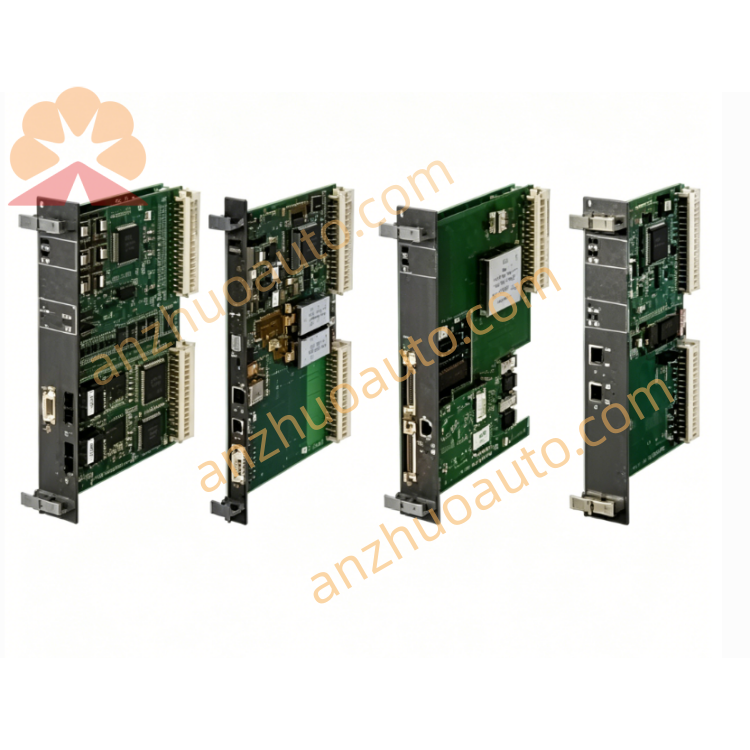
IS215UCVDH5A serves as the central control core of GE Mark VI/VIe distributed turbine control rack. It executes all critical safety control algorithms of the unit, collects field signal data through multi-type industrial buses, distributes control commands to each I/O processor board, and uploads operating parameters and fault records to upper monitoring system. Multi-group redundant communication interfaces avoid single-point communication failure of safety loops. The front-panel LED array provides visual real-time diagnosis of power status, running state, bus link and hardware faults. Conformal coating technology effectively prevents circuit damage caused by dust, moisture and corrosive gas in industrial cabinets. Triple redundant parallel installation can be realized to meet the safety standards of power generation equipment.
2. Core Technical Specifications
Real-time industrial processor
Onboard DRAM and Flash memory for program and data storage
QNX real-time operating system pre-installed
10Base-T Ethernet port for HMI and remote monitoring
DLAN+ internal high-speed bus
Dual redundant ISBUS interfaces for I/O data transmission
Dual Genius bus terminals
RS232 serial debugging COM port
Manual hardware reset button
Wide-range DC power input for VME rack standard power supply
Overvoltage, overcurrent and reverse connection protection circuit integrated
Environmental Performance
Operating Temperature: 0℃ ~ +60℃
Storage Temperature: -30℃ ~ +70℃
Relative Humidity: 10%–95% RH, non-condensing
PCB protection: Conformal anti-corrosion coating
Mechanical Specifications
Mounting method: Standard VME dual-slot rack installation
Anti-vibration industrial PCB layout
Origin: Salem, Virginia, USA
Warranty: 12-month factory warranty for new original boards
3. Front Panel Function Description
LED Diagnostic Indicator Area
Power LED: Steady green = normal power supply; Off = power failure
Run LED: Slow green flash = normal control operation; Fast flash = firmware updating
Fault LED: Solid red = critical hardware fault; Amber flash = minor system warning
Bus Link LEDs: Corresponding light flicker means the matched communication bus transmits data normally
Communication Terminal Area
Ethernet port: Connect to local operation touch screen and remote monitoring server
DLAN+, ISBUS, Genius terminals: Internal bus wiring with I/O processor and termination modules
COM serial port: Connect handheld debugger for offline program reading and fault analysis
Reset Button
Manual hardware reset key for forced board restart during abnormal program operation
4. Standard Installation Steps
Step 1 Cabinet Preparation
Install standard GE VME control rack, reserve two adjacent empty slots for IS215UCVDH5A. Reserve no less than 5cm ventilation space around the board to avoid heat accumulation under full-load operation, and check the normal operation of cabinet cooling equipment.
Step 2 Board Insertion and Fixing
Align the main control board with VME slot guide rails, push the board fully into the rack until the front panel fits tightly with the rack surface. Tighten the fixing screws on both sides of the panel to prevent displacement caused by mechanical vibration during equipment operation. Multiple boards can be installed side by side to build triple redundant control architecture.
Step 3 Bus Wiring Operation
Connect internal DLAN+, ISBUS and Genius bus cables between IS215UCVDH5A and each PMVP I/O processor board;
Insert Ethernet cable into the front Ethernet port to connect monitoring HMI;
Connect serial debugging cable to COM port if offline maintenance is needed;
Confirm VME rack DC power supply wiring is connected correctly without polarity reversal.
Step 4 Pre-Power-On Inspection
Check all bus connectors are fully inserted without looseness, extrusion or aging damage of cables. Only GE original shielded industrial communication cables can be used to reduce electromagnetic interference. Confirm no short-circuit risk inside the rack before power on.
Step 5 Power-On Commissioning
Switch on the DC power supply of the whole VME rack. Observe Power LED keep steady green, Run LED flicker slowly, and each bus link LED flashes alternately. Connect debugging equipment through COM port to check board address, control program integrity and communication link status, complete installation acceptance after all indexes are normal.
5. Daily Operation & Maintenance Rules
Normal Operating Standard
All LED indicators operate within normal state, no long-term red fault alarm; turbine control HMI displays no communication interruption, signal loss or control logic error alarm.
Regular Inspection Items
Shift inspection: Record the status of all front-panel LED indicators and abnormal alarm information
Monthly maintenance: Use dry air blower to clean dust on the board ventilation area to prevent heat dissipation blockage
Quarterly inspection: Retighten all bus wiring terminals, check connector oxidation and cable aging degree
Environmental Maintenance
Keep the control cabinet sealed and equipped with dehumidification device, isolate corrosive gas, conductive dust and water vapor outside the rack installation area.
6. Fault Diagnosis & Troubleshooting
Fault 1: Power LED always off
Possible Causes: VME rack power supply cut off, power polarity reversed, internal power circuit burned out
Solutions: Test rack DC power output voltage; rewire power terminals in correct positive and negative polarity; replace the board if internal power hardware is damaged.
Fault 2: Red Fault LED keeps steady on
Possible Causes: Communication bus short circuit, firmware file corruption, internal processor hardware damage
Solutions: Disconnect each bus cable one by one to locate short-circuit point; re-flash official control firmware through serial COM port; replace the board for permanent hardware failure.
Fault 3: Single bus link LED does not light up
Possible Causes: Corresponding bus cable loose or damaged, bus interface circuit fault
Solutions: Re-plug or replace matched original bus cable; test communication circuit through serial debugger; replace the board if interface chip fails.
Fault 4: Run LED flashes rapidly and control logic disorder
Possible Causes: Firmware upgrade interrupted without finishing, cabinet internal temperature over 60℃
Solutions: Complete the full firmware upgrade process without power cut; start cabinet cooling equipment to reduce ambient temperature.
Fault 5: Serial COM port no communication response
Possible Causes: Port blocked by dust, mismatched debugging cable, board system program crash
Solutions: Wipe COM port with clean soft cloth; use GE official dedicated debugging cable; press reset button to restart the board and restore basic program.
7. Safety Precautions
Cut off all DC power of the entire VME rack before disassembly, wiring or maintenance work to avoid electric shock and full system communication collapse.
Only matched original GE I/O modules and official shielded bus cables are allowed for matching connection; uncertified third-party accessories will void the factory warranty.
Stop turbine operation immediately and activate cooling equipment when cabinet internal temperature exceeds 60℃; long-term over-temperature will cause irreversible damage to the main control board circuit.
Unauthorized disassembly of the board shell and internal circuit components is prohibited; hardware damage caused by private disassembly is not covered by the warranty.
Anti-static and shockproof packaging must be used for product transportation and storage; avoid heavy collision, extrusion and static discharge to protect internal precision processor chips.
This board undertakes the core safety control function of turbine units. All replacement, debugging and maintenance operations must be completed by certified GE industrial control professional technicians.
8. Long-Term Storage Requirements
Store IS215UCVDH5A in dry and ventilated warehouse, storage temperature range -30℃ ~ +70℃, relative humidity controlled below 80%. Keep away from chemical corrosives, heavy pressure and mechanical impact. Boards stored for more than 6 months need full communication, program and control function testing before formal rack installation.
Reliability Statement
Confirmed Information: IS215UCVDH5A is GE Mark VI/VIe UCVD VME dual-slot main control board, multi-redundant mixed communication interfaces, front LED diagnosis array, conformal coated PCB, 0~60℃ operating temperature, triple redundant rack installation, American original production, 12-month standard warranty.
Information to Be Further Verified: Exact overall dimensions, rated power consumption value, complete official fault code list, detailed COM port firmware upgrade operation steps.

Get a Quote