
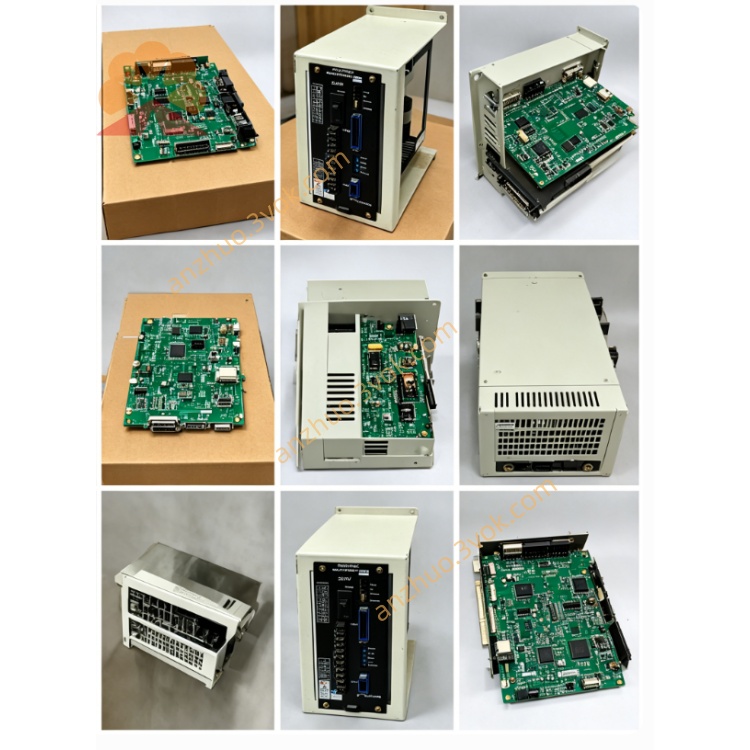
JANCD-SR03
JANCD-SR03 is a main system CPU board developed by Yaskawa Electric and Motoman Robotics. It is the upgraded and final version within the SR01, SR02 and SR03 series, designed for legacy CNC and robot control units. This board adopts the standard plug-in card form factor for Yaskawa backplane installation, and it can serve as a direct replacement for JANCD-SR01 and JANCD-SR02 due to full pin compatibility. The product has been discontinued, and only used or refurbished units are available in the current market.
Description
1. General Information
JANCD-SR03 is a main system CPU board developed by Yaskawa Electric and Motoman Robotics. It is the upgraded and final version within the SR01, SR02 and SR03 series, designed for legacy CNC and robot control units. This board adopts the standard plug-in card form factor for Yaskawa backplane installation, and it can serve as a direct replacement for JANCD-SR01 and JANCD-SR02 due to full pin compatibility. The product has been discontinued, and only used or refurbished units are available in the current market.
2. Technical Specifications
The board operates on +5 V DC and ±12 V DC power supplied from the system backplane, with a maximum operating current of 2.0 A. It is equipped with a high-performance 16-bit central processing unit that features an extended instruction set and higher operating clock speed. The on-board memory includes 512 KB ROM for firmware storage and 256 KB RAM for system operation and data caching. A built-in hardware watchdog circuit and voltage detection module ensure stable system operation and automatic protection against abnormal power supply.
For environmental adaptability, the normal working temperature ranges from 0 degrees Celsius to 45 degrees Celsius. The allowable storage temperature is between -20 degrees Celsius and 60 degrees Celsius. The applicable relative humidity ranges from 5% to 85%, and condensation is strictly prohibited during operation and storage.
3. Core Functions
This CPU board undertakes the core operation of the entire control system. It runs the built-in operating system, interprets and executes user programs, and completes trajectory planning for servo axes. Compared with earlier models, it supports more servo axes for synchronous control and delivers faster operation response.
It manages all digital input and output signals of the system, and maintains stable data transmission through the built-in bus circuit. It also establishes reliable communication with peripheral interface boards such as JANCD-SP17B, SP20 and SP21, to realize data interaction between the main control unit and the operator panel.
The board integrates comprehensive system monitoring and fault diagnosis functions. It can collect real-time operating status of each module, record detailed alarm information and fault codes, which greatly facilitates daily inspection and equipment troubleshooting. It maintains full backward compatibility with old firmware, so it can be applied to all late-stage configurations of matching control systems.
4. Applicable Scope
This CPU board is applicable to all late revisions of YASNAC LX and MX series CNC systems, as well as full-function configurations of Motoman ERC robot controllers. It works perfectly with all supporting interface boards in the SP series. It cannot be used on new-generation controllers including XRC, NX100, DX series and YRC series, nor is it compatible with later CPU boards such as JANCD-SR21.
5. Installation and Operation Notes
Cut off the total power of the equipment first and wait for no less than five minutes to make sure all internal capacitors are fully discharged before any disassembly or installation work. Always wear an anti-static wrist strap during handling to prevent static electricity from damaging sensitive electronic components on the board.
Align the board with the designated slot on the backplane and insert it smoothly, then fasten the fixing screws to ensure firm installation. After all connecting cables are reconnected correctly, restore the power supply and check the system startup status, display feedback and axis operation performance.
6. Troubleshooting
If the system fails to boot normally, check whether the backplane power supply is normal, reinsert the board and clean the gold-plated contacts on the edge to eliminate poor contact. When the system runs intermittently or freezes, inspect the matching firmware version and test the working state of on-board memory chips.
If abnormal alarms or motion deviation occur during axis operation, check the connection of servo bus cables and verify the correctness of system parameter settings. In case of communication interruption between the main board and the operator panel, re-seat all adjacent boards and inspect the internal bus circuit of the backplane.
7. Daily Maintenance and Safety Rules
Never plug or unplug the board or related cables when the equipment is powered on. Keep the board and the inside of the control cabinet clean and dry, and avoid long-term exposure to dust, oil mist and corrosive gas. Conduct regular inspections on connectors and contacts to prevent performance degradation caused by aging or oxidation. All maintenance work must follow the safety regulations of industrial electrical equipment.
8. Disclaimer
This content is a technical summary for reference only. Yaskawa Electric reserves the right to adjust product technical parameters without prior notice. Please refer to the official original manual for complete and authoritative technical standards and operation guidelines.
Get a Quote